Table of Contents (click to expand)
A laser printer turns your file into a print by using electrostatic charge: a primary charge roller lays a uniform negative charge on the photoreceptor drum, the laser discharges the spots where the image should appear, negatively charged toner sticks to those discharged spots, a positively charged sheet of paper pulls the toner off the drum, and a heated fuser unit melts the toner permanently into the paper.
From school papers to corporate reports and everything in between, we use printers when it comes to creating any form of hard documented material. Most of the printers today also come with a myriad of color options, which allow for HD-quality pictures to be printed with precision and ease. The levels of technology the printer progressed through on its journey to reach such sophistication is quite interesting. Let’s look at some of the history that came before the advent of the modern printer.
History Of The Printer
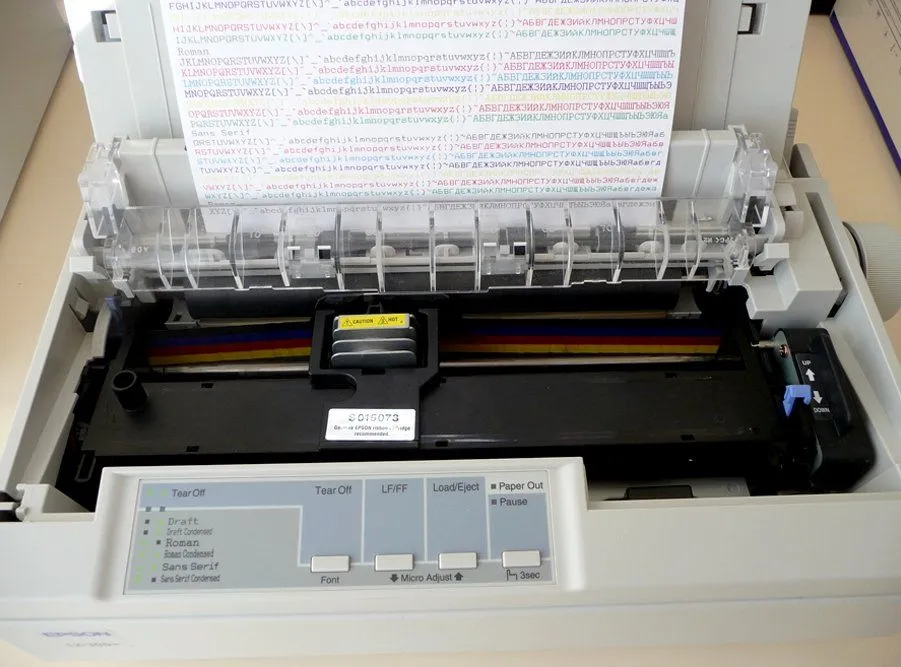
Before our modern-day printer with its incredible level of precision, the field of printing materials used very draconian methods and machinery. Until the 1980s, the concept of a personal computer was basically non-existent. There were only a few who had “hard copies” or the infamous dot matrix printers. These made horrendous screeching noises during the process of printing. The dot matrix printer used a grid of tiny metal needles, pressed against an inked ribbon, to form the shapes of letters, numbers and symbols on the page. They printed each character individually, line by line, at a typical speed of about 80 characters (one line of text) per second, so a page would take about a minute to print. These dot matrix printers can still be seen in use, as they are today used for printing bills and address labels.
The funny thing is that laser printers were already in development as early as the 1960s. The basic principles were worked out by Gary Starkweather at Xerox PARC in 1971, leading to an internal research printer called the Xerox Dover (which was never sold commercially). The first commercial laser printer was the Xerox 9700, launched in 1977 for roughly $300,000 per unit. What made it so special at the time was the fact that it could print up to 120 pages per minute, around two pages every second.
However, it was two companies that were responsible for the laser printer becoming a mass public commodity. Those two companies were HP and Apple. HP sold their version of a laser printer named ‘Laserjet’, which sold for a price $3,495. The Apple counterpart to this is the “Apple LaserWriter”, which sold for almost double the amount at $6,995.

What Are The Main Types Of Printers?
Before we open up any single machine, it helps to know that “printer” is really an umbrella term for a few very different technologies. Almost everything you will meet falls into one of two families: impact printers, which physically strike the page through an inked ribbon, and non-impact printers, which lay ink or toner down without ever hammering the paper.
The dot matrix printer we met above is the classic impact machine, which is exactly why those old receipt and invoice printers sound like an angry wasp. Today the action has almost entirely moved to non-impact designs, and the two you are most likely to actually own are the inkjet printer, which sprays microscopic droplets of liquid ink, and the laser printer, which uses static electricity and powdered toner. As a rough rule of thumb, inkjets are cheaper to buy, excellent for color photos and the default in most homes, while laser printers are faster and cheaper per page on plain text, which is why offices love them. Britannica groups both under “non-impact” printers precisely because neither one bashes the paper to make a mark.
Beyond those everyday workhorses sit the specialists: thermal printers that simply darken heat-sensitive paper (think shop receipts and shipping labels, with no ink or toner at all), and 3D printers, which are not really “printers” in the document sense. Rather than ink, a 3D printer builds a solid object by adding material one thin layer at a time, a process formally known as additive manufacturing. For the rest of this article, we will stay with the two machines that produce the documents and photos sitting on your desk: the laser printer and the inkjet.
Working Of A Laser Printer
Whenever you print something, the laptop or computer you use sends a large stream of data to your printer. Typically, a few megabytes or a million characters. There is an onboard electronic motherboard that receives this signal from the laptop or computer. It then decodes all the data sent into simple machine-level language, which is used for making the different components of the laser printer act in a certain way.
The electronic motherboard then activates the primary charge roller (a refined replacement for the older corona wire used in early laser printers). The charge roller is a high-voltage component whose job is to lay down a uniform negative electrostatic charge of around -600 to -900 volts across the entire surface of the photoreceptor drum.
At the same time, the electronic motherboard activates the laser. The laser itself stays put and is steered onto the spinning drum by a fast-rotating polygon mirror, drawing the page image one scan line at a time. Wherever the laser hits the drum, it discharges that spot, leaving it nearly neutral, while the parts of the drum that should print white stay at their original strong negative charge. The resulting electrostatic “latent image” on the drum is the layout for the printable material.
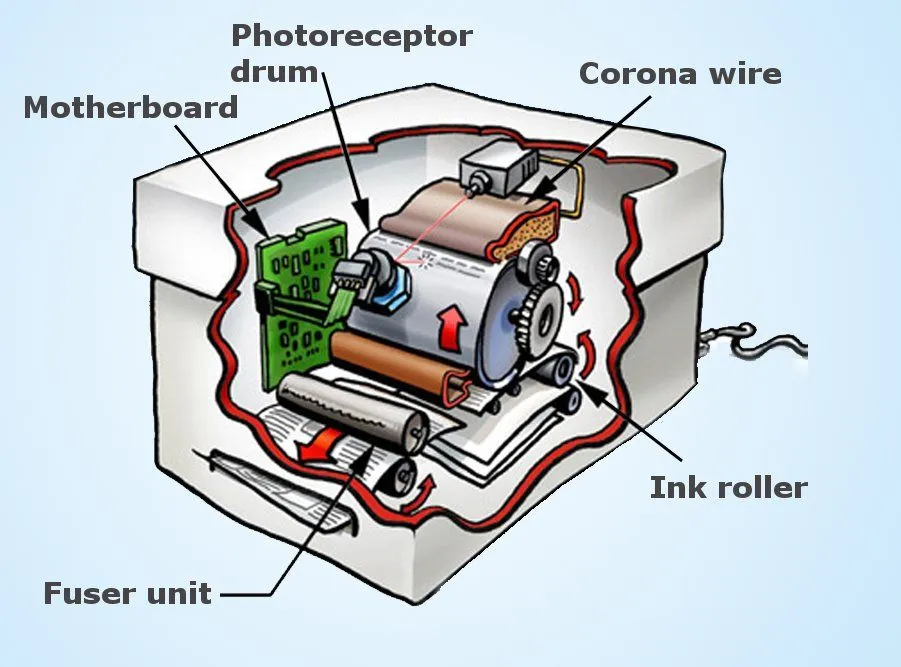
Next, the developer roller (sometimes called the ink roller) presses against the photoreceptor drum, coated with toner: tiny particles of powdered plastic-and-pigment ink. The toner is negatively charged, just like the unexposed parts of the drum, but since like charges repel, the toner is pulled off the developer roller and onto the discharged (less negative) parts of the drum, where the laser previously hit. The toner sticks to exactly the pattern of the page you want to print.
A sheet of paper is then rolled under the drum. A transfer corona (or transfer roller) gives the back of the paper a strong positive charge that easily overpowers the toner’s grip on the drum, so the toner jumps from drum to paper. The paper then passes through two hot rollers, the fuser unit, which heats the toner above its melting point (typically around 180 °C / 356 °F) and presses it permanently into the fibers of the paper. That is how a laser printer turns ones and zeros into a physical page. So, the next time you print out a report, take a moment to appreciate the elegant electrostatic ballet that goes into every copy.
How Does An Inkjet Printer Work?
If a laser printer is the workhorse of the office, the inkjet is the printer most likely to be sitting in your home. It throws away the drum, the toner and the static charge entirely. Instead, it does something that sounds almost too simple to work: it sprays the page with thousands of tiny droplets of liquid ink, squirted through nozzles finer than a human hair. The print head sweeps back and forth across the paper on a sliding rail while the rollers nudge the sheet forward a fraction at a time, so the image is built up one band of droplets after another.

The clever part is how each droplet is fired, and there are two main methods. Most home printers, including the bulk of Canon and HP machines, use thermal inkjet, sometimes called bubble jet. Behind each nozzle sits a tiny resistor that is pulsed with current for just a few microseconds. It heats the ink so violently fast that a microscopic spot superheats past roughly 330 °C (626 °F) and flash-boils into a vapor bubble. As that bubble explodes outward it shoves a droplet of ink out of the nozzle and onto the page, then collapses and pulls fresh ink in behind it, ready for the next shot. The whole boil-and-fire cycle is over in tens of microseconds, which is how a single nozzle can fire thousands of times a second.
The other method is piezoelectric inkjet, used most famously by Epson. Here there is no heat at all. Each nozzle is backed by a piezoelectric crystal, a material that physically changes shape when a voltage is applied across it. A quick electrical pulse flexes the crystal, the flex squeezes the ink chamber like a finger on an eyedropper, and a droplet is pushed out. Because the ink is never cooked, piezo heads can handle a wider range of specialist inks, which is one reason they dominate large-format and industrial printing. Either way, the droplets themselves are astonishingly small, only a few picoliters (trillionths of a liter) each, which is what lets an inkjet lay down photo-quality detail.
Color comes from mixing just four inks, the familiar CMYK set of cyan, magenta, yellow and black, in tiny overlapping dot patterns your eye blends into millions of shades. Those inks come in two flavors: cheaper dye-based inks that dissolve fully in their liquid carrier and give vivid color but fade faster, and pigment-based inks made of solid particles that resist water and sunlight far better, which is why they are favored for documents meant to last. The thermal-bubble trick was worked out independently and at almost the same moment by two engineers who had never met: Canon’s Ichiro Endo, who filed the founding bubble jet patent in October 1977, and Hewlett-Packard’s John Vaught, whose team in Corvallis cracked it in late 1978. Their accidental discovery built a multi-billion-dollar industry and put a color printer on practically every desk.
References (click to expand)
- Xerox.
- Laser printing.
- How Laser Printers Work. HowStuffWorks.
- Laser printer. Encyclopaedia Britannica.
- Ink-jet printer. Encyclopaedia Britannica.
- Printer: Definition, Types, & Facts. Encyclopaedia Britannica.
- Inkjet printing. Wikipedia.
- Canon Celebrates 30th Anniversary of Launch of First Bubble Jet Inkjet Printer. Canon Global.
- Bubble Nucleation Pulse-Width in Thermal Inkjet Actuators. Journal of Heat Transfer (ASME).