Mobile data drains more battery than Wi-Fi, and 5G drains more than 4G. Here is what studies show, plus whether Wi-Fi calling and toggling data save power.
Have you ever noticed that your phone’s battery drains faster when using mobile data than when connected to a WiFi network? Is there a correlation between battery drain and internet connection through mobile data versus WiFi?
Let’s find out.
Why A Network Connection Drains Battery
Data transmission is necessary when a phone communicates with other devices, whether it’s using wifi or cellular data. This transmission involves two processes: generating and propagating data and retrieving data.
To accomplish this, a transmitter and receiver antenna are used.
The transmitter consists of a long, thin conductor connected to an alternating current (AC) supply. When AC current flows, electrons begin to oscillate, causing the acceleration and deceleration of electric charges. This, in turn, produces electromagnetic (EM) waves that propagate in all directions. Data is transmitted in the form of EM waves.
On the other end, the receiver contains a long, thin conductor that absorbs energy from the EM waves when they strike the antenna. This energy causes the electrons to oscillate at the same frequency as the incident waves. The electronic oscillation creates an AC current in the receiving antenna, which is then converted to a suitable form, such as sound, video, or text.
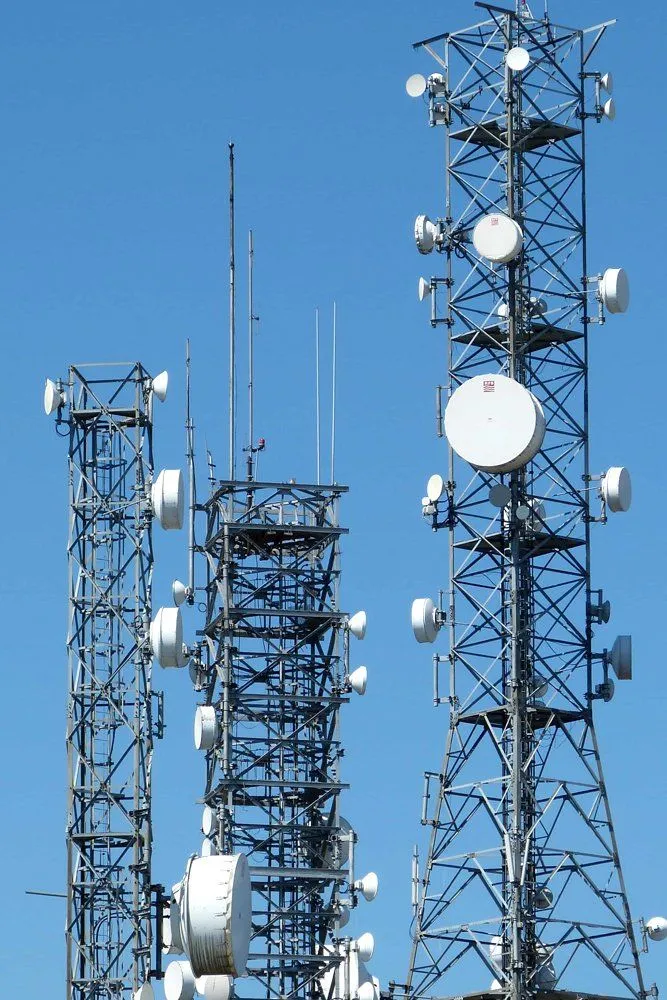
It’s important to note that energy is required for transmitting and receiving data, and the phone’s battery provides this energy. As the distance between the transmitter and receiver antennas increases, the power output at the receiver antenna drops by the inverse square of the distance from the transmitter.
This means that doubling the distance between the antennas reduces the power output by four times.
More power is required at the transmitter to maintain the signal strength, which results in additional battery usage.
Meta-Analysis: Wi-fi Versus GSM Power Consumption
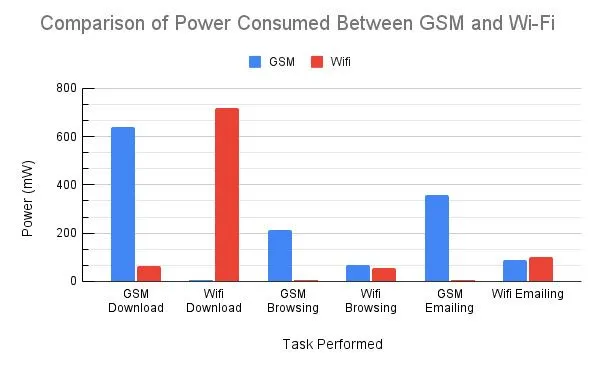
To establish the disparity of power consumption between GSM and Wi-Fi, some typical usage scenarios were simulated in a study. These scenarios included emailing, downloading random data, and web browsing. The device used was OpenMoko Neo Freerunner. Two other devices, HTC Dream and Google Nexus One, were used to validate the initial observations on Freerunner.
Mobile data and Wi-fi were alternately used to perform the tasks mentioned above. The power consumed is measured by multiplying the voltage supplied and the current drawn during that specific task.
Emailing
The power usage for receiving and reading five emails and replying to two of them is as follows:
| GSM Power Consumed (mW) | Wi-Fi Power Consumed (mW) | |
| Email Over GSM | ~360 | ~5 |
| Email Over Wi-Fi | ~90 | ~100 |
| Aggregate | ~450 | ~105 |
When emails were sent over wifi, GSM consumed some power to keep the device connected to the cellular network. This power consumption was about 90 mW. When emails were sent over GSM, the wifi power consumption dropped to nearly nil.
Downloading Random Data
A 15 MB file was downloaded over Wi-Fi, and a 50 KB file was downloaded over GSM. It must be noted that the power consumed depends on the throughput (amount of data transferred per second) and is independent of the total file size.
| GSM Power Consumed (mW) | Wi-Fi Power Consumed (mW) | |
| Download Over GSM | ~640 | ~62 |
| Download Over Wi-Fi | <5 | ~720 |
| Aggregate | ~640 | ~782 |
The aggregate power consumed by Wi-Fi was more than that consumed by GSM. This was because the throughput for Wi-Fi was 660.1 ± 36.8 KB/s, and for GSM, 3.8 ± 1.0 KB/s. The former’s higher power consumption over Wi-Fi was explained by the greater power required to process downloaded data at a higher throughput.
Web Browsing
| GSM Power Consumed (mW) | Wi-Fi Power Consumed (mW) | |
| Browsing Over GSM | ~215 | <5 |
| Browsing Over Wi-Fi | ~70 | ~55 |
| Aggregate | ~285 | ~55 |
It is evident that browsing over GSM consumes more power than browsing over Wi-Fi. This is because a background connection to the cellular network is always maintained to receive calls and texts.
Summary
Energy Efficiency: GSM Versus Wi-Fi
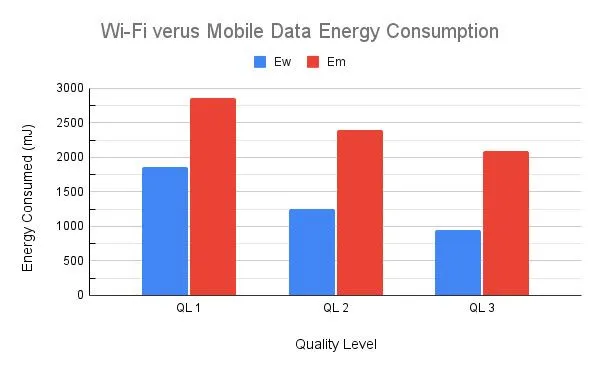
The energy consumption and energy efficiency of GSM and Wi-Fi to stream videos were compared at different locations inside a university campus. The video was played at three different display qualities. Four locations were considered. The findings were as follows:
| Ew: Wi-Fi Energy Consumed (mJ) | Em: Mobile Data Energy Consumed (mJ) | Percentage Increase of Energy of Mobile Data over Wi-Fi ((Em - Ew) / Ew) × 100 | |
| QL 1 | 1859.44 | 2865.75 | 54.11 |
| QL 2 | 1247.41 | 2391.97 | 91.75 |
| QL 3 | 947.51 | 2090.59 | 120.64 |
| Aggregate (QL 1 + QL 2 + QL 3) | 4054.36 | 7348.31 | 88.82 |
Here, QL 1 boasts the highest quality, and QL 3 is the lowest.
For all quality levels, mobile data consumed more energy than Wi-Fi. The lower the streaming resolution, the greater the disparity. This is because lower-quality streaming requires less energy consumption, but the phone maintains a baseline cellular connection to receive texts and calls, which adds to the battery drain.
Does 5G Use More Battery Than 4G Or Wi-Fi?
The studies above tested older 2G/GSM and Wi-Fi, but most of us now ask a more modern question: does switching to 5G drain the battery faster than 4G, and how does either compare to Wi-Fi? The short answer is that 5G data tends to drain more battery than 4G, and both cellular generations still drain more than Wi-Fi for the same task.

An analysis of Speedtest Intelligence data from Ookla found that, in real-world use, smartphones on 5G drained their batteries roughly 6% to 11% faster than the same class of devices on 4G LTE. The exact gap depended heavily on the phone’s chipset: the most efficient processor in that analysis (Qualcomm’s Snapdragon 8 Gen 2) recorded about 31% battery drain on 5G versus 25% on 4G LTE.
A big reason is the way most early 5G is delivered. In Non-Standalone (NSA) mode, the phone keeps a 4G LTE connection running at the same time as the 5G one, so two radios are active instead of one. Hunting for a distant 5G cell, or running an extra modem, adds to the load.
Interestingly, the 5G standard itself is not the villain. According to Ericsson, the “ultra-lean” design of 5G NR lets the radio sleep for far longer between mandatory transmissions (up to 20 ms in standalone mode, versus a maximum of 0.2 ms in LTE), which makes it more energy-efficient per bit of data moved. The catch is that 5G also encourages us to move a lot more data at much higher speeds, so the total energy bill often goes up even when each bit is cheaper. As phones move to integrated modems and true standalone 5G, the gap with 4G is expected to keep shrinking.
Does Wi-Fi Calling Use More Battery?
Wi-Fi calling routes your voice calls over the internet through your Wi-Fi connection instead of the cellular voice network. Whether it saves or wastes battery depends almost entirely on your signal situation.
The deciding factor is the same physics covered earlier: the weaker the cellular signal, the more transmit power your phone needs. Research by Ding and colleagues at SIGMETRICS confirmed that poor signal strength substantially increases the energy a phone burns to move the same data, for both cellular and Wi-Fi links. So if you are sitting in a basement or a rural patch with one bar of cellular, your phone is working hard (and draining fast) just to hold that weak connection. Switching the call onto a strong Wi-Fi network lets the power-hungry cellular radio relax, which genuinely saves battery.
The flip side is that Wi-Fi calling keeps the Wi-Fi radio awake for the whole call and adds background work to keep the call stable. If your Wi-Fi itself is weak or keeps dropping (forcing the phone to hand the call back and forth between Wi-Fi and cellular), it can end up using more power than a normal call on a strong cellular signal would have. In other words, Wi-Fi calling is a battery win in weak-cellular, strong-Wi-Fi situations, and a battery drain when the Wi-Fi is flaky.
Does Turning Off Wi-Fi Or Mobile Data Save Battery?
Since the radios are doing the draining, a fair question is whether you should just switch them off when you are not browsing. The honest answer is: a little, but usually less than people expect, and it depends on which radio.

An idle Wi-Fi connection sips very little power. As the streaming study showed, once you stop transferring data, Wi-Fi energy use drops close to zero, so leaving Wi-Fi on while connected to a known network is rarely worth toggling off. The bigger hidden cost is background Wi-Fi scanning. Google’s Android developer documentation notes that when apps repeatedly scan for nearby Wi-Fi networks in the background, each scan wakes up the CPU, and too many scans can noticeably shorten battery life (Android flags more than four scans per hour as excessive). Many phones also keep scanning for networks even when Wi-Fi looks switched off, because “Wi-Fi scanning” for location accuracy is a separate setting that is on by default.
Mobile data behaves differently. Because the phone keeps a baseline link to the cellular tower for calls and texts no matter what, turning data off saves less than you might hope. The real saving comes when you are in an area of weak coverage: rather than let the phone keep straining to maintain a far-off, faint signal, switching the radios off (for example with airplane mode while you sleep) prevents that constant high-power searching. If you want fewer phantom drains without going fully offline, disabling background Wi-Fi and Bluetooth scanning in your location settings is usually a more effective lever than flicking Wi-Fi itself on and off.
Conclusion
It is clear that mobile data consumes more energy than Wi-Fi in practical situations. This is because a cellular connection must always be maintained for calls and messages.
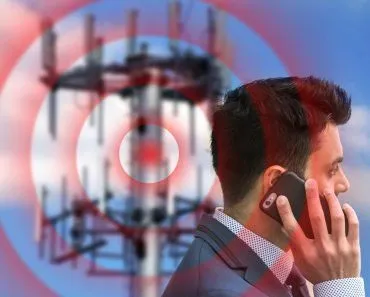
Furthermore, cellular towers are usually situated far away compared to Wi-Fi routers. In areas with weak cellular coverage, the phone receives a weak signal, which leads to increased effort to maintain the network connection. This effort results in higher power consumption.
Also, moving from one place to another requires the phone to switch connections from one cellular tower to another, contributing to battery drain.
In contrast, Wi-Fi routers are generally located within a range of 100 meters, which is significantly closer than the distances between cellular towers and phones. Since Wi-Fi connections are not necessary for calls and messages, the energy consumed by Wi-Fi drops almost to zero when not in use!
Last Updated By: Ashish Tiwari
References (click to expand)
- Zou, L., Javed, A., & Muntean, G.-M. (2017, June). Smart mobile device power consumption measurement for video streaming in wireless environments: WiFi vs. LTE. 2017 IEEE International Symposium on Broadband Multimedia Systems and Broadcasting (BMSB). IEEE.
- An Analysis of Power Consumption in a Smartphone.
- Smartphone Energy Drain in the Wild: Analysis and Implications.
- Lee, K., Lee, J., Yi, Y., Rhee, I., & Chong, S. (2013, April). Mobile Data Offloading: How Much Can WiFi Deliver?. IEEE/ACM Transactions on Networking. Institute of Electrical and Electronics Engineers (IEEE).
- 5G energy consumption: the impact of 5G NR. Ericsson.
- Qualcomm Chips Most Efficient in Battery Performance while Connected to 5G (Ookla Speedtest Intelligence data). TelecomTalk, 2023.
- Excessive Wi-Fi Scanning in the Background. Android Developers, Google.
- Ding, N., Wagner, D., Chen, X., Pathak, A., Hu, Y. C., & Rice, A. (2013). Characterizing and Modeling the Impact of Wireless Signal Strength on Smartphone Battery Drain. ACM SIGMETRICS.