Table of Contents (click to expand)
When you visit a website, your browser uses DNS to turn the site’s name into the server’s numeric IP address. It then sends a request across the Internet as small data packets. The server replies with the page split into packets, which your device reassembles in order, all in a couple of seconds.
All of us with access to the Internet have probably visited hundreds or thousands of websites by now in our lives. If you’re a bit unsure about what a website is, don’t worry…. you are almost certainly viewing this very article on a website. However, that doesn’t mean that you know the story behind visiting websites.
In real life, your journey takes only a couple of seconds (the same amount of time it takes for the website to load onto your device), but this story might have covered a thousand miles in those few seconds. Yes, a thousand miles in just a few seconds! Now, let’s slow down time a bit and examine what actually goes on when we want to visit a website.
Choose Your Website
The first and perhaps simplest step is to choose the website you wish to visit. Now, let’s first establish what a website is. Have you ever visited Facebook? Well, that’s a website. Reddit? That’s a website too. Snapchat, Instagram or YouTube? Website, website and… yet another website. All you need to do is click on the website in your bookmarks or enter the website name in the search bar. That’s when the magic happens.
How Does Your Device Find The Website?
Here’s the catch: you typed in a name like facebook.com, but the Internet doesn’t actually run on names. It runs on numbers called IP addresses (think of something like 157.240.3.35). So before anything else can happen, your device has to translate the friendly name you typed into the numeric address of the right server. The system that does this is the Domain Name System, or DNS, and it works a lot like the contacts list on your phone: you tap a friend’s name, and your phone quietly looks up the number behind it.
When you hit Enter, your device first checks its own memory to see if it has looked up that name recently. If not, it asks a helper called a DNS resolver (usually run by your Internet provider or a public service such as Google or Cloudflare). The resolver works its way up a chain of name servers, starting near the top of the Internet’s directory and narrowing down until it finds the server that officially knows the address for that website. It hands the IP address back to your device, which then tucks it away for a while so the next visit is faster.
This entire lookup usually finishes in a fraction of a second, and only once your device has the server’s numeric address can it actually go and ask for the page. So that name-to-number translation is the quiet first step behind every website you visit.
The Request
If you don’t already know, the Internet basically works according to the client-server model. Imagine that you’re ordering a Big Mac. You ask the person behind the counter for a Big Mac and he gives you one. The same thing is true for websites, which are actually stored on devices called servers.
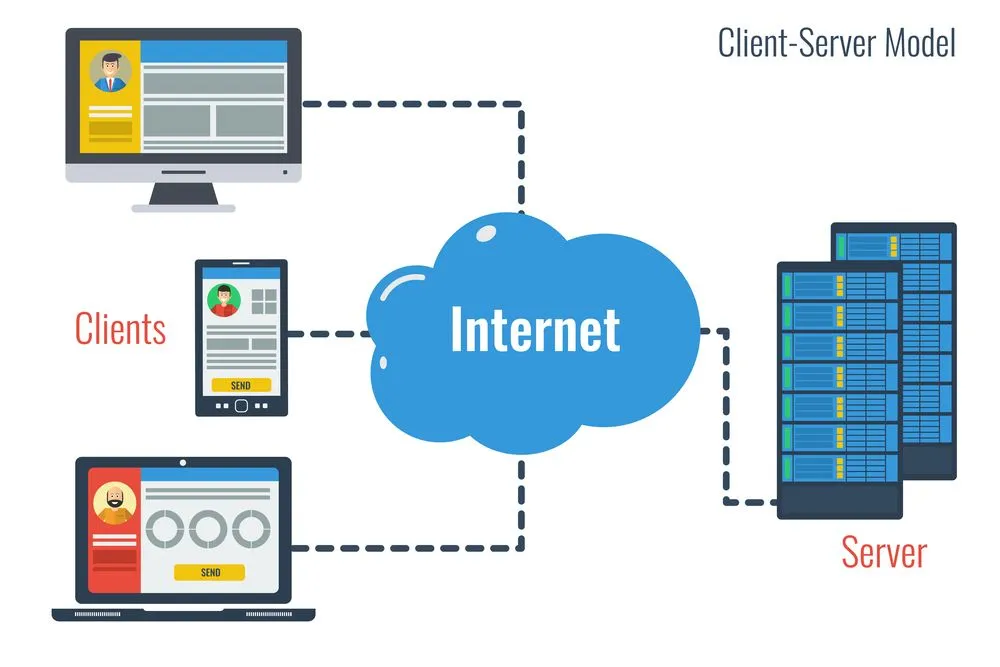
These servers can be stored anywhere in the world. Whenever you want to visit a website, your device generates a request that will be sent to the server.
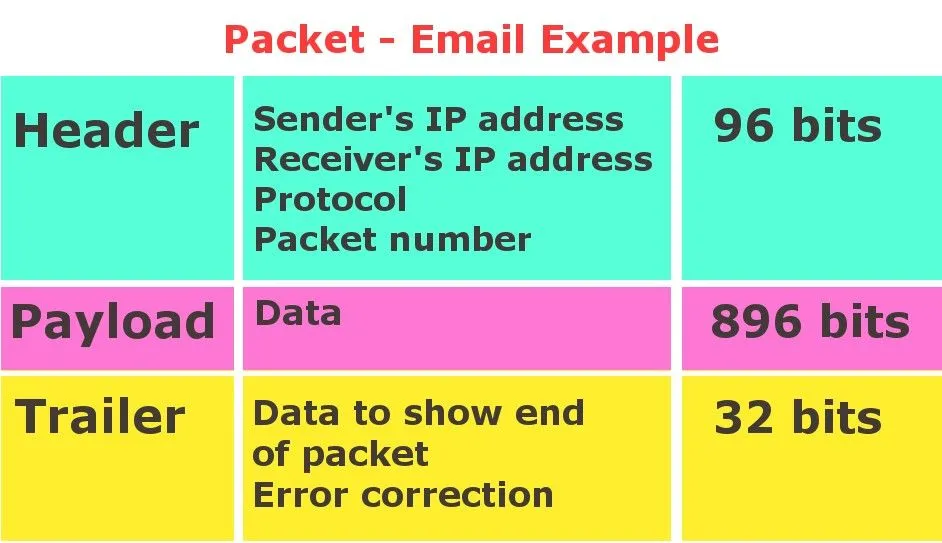
Now, once this request is made, things get really interesting. The request that we make to a web server is achieved digitally in the form of a ‘packet’ of data. We can correlate this so-called network packet to a letter that we might send someone. Just like an envelope, a packet will contain the address of the sender (IP address of the device you’re using), the address of the receiver (IP address of the server from which you’re requesting data) and it will store the actual request inside it.
Cyclic Redundancy Check (CRC)
The packet also contains a sort of a seal, which is used to check the authenticity of a packet. With over a billion packets of data being transferred over the Internet, a packet might lose some of its data or the data might become corrupted. For the receiver to certify that the data is authentic and has no errors, this “authenticity check” is used. One of the most widely applied checking methods is the Cyclic Redundancy Check (CRC), which is pretty neat. We know that data is stored and saved digitally as numerals, namely 0s and 1s. Before sending a packet, the sender treats those bits as one giant binary number and divides it by a fixed, agreed-upon number called the generator polynomial. It throws away the answer and keeps only the remainder, a short string of bits that gets attached to the packet. When the packet arrives, the receiver runs the exact same division on the data. If it gets the same remainder, the packet is almost certainly intact; if even a single bit got flipped or lost along the way, the remainders won’t match and the packet is flagged as corrupted.
The Transmission
Now that this packet has been generated, it’s ready to go. The packet will first travel via telephone or cable wire through various networks. If you have an Internet connection to your house, you might already know that your Internet passes through telephone or cable wires connected to your house. After going through these wires over various networks, the packet will end up in the main Internet hub of your region or country, which is akin to your local post office. Here, the server’s IP address will be decoded to the area where it is located.
Suppose the website you want to visit has servers abroad. Just as a letter would be sent from your local post office to the local post office of the sender, the main Internet hub of your country will send the packet to the Internet hub of the country where the server is located. That Internet hub will then finally send the request to the server via its local networks.
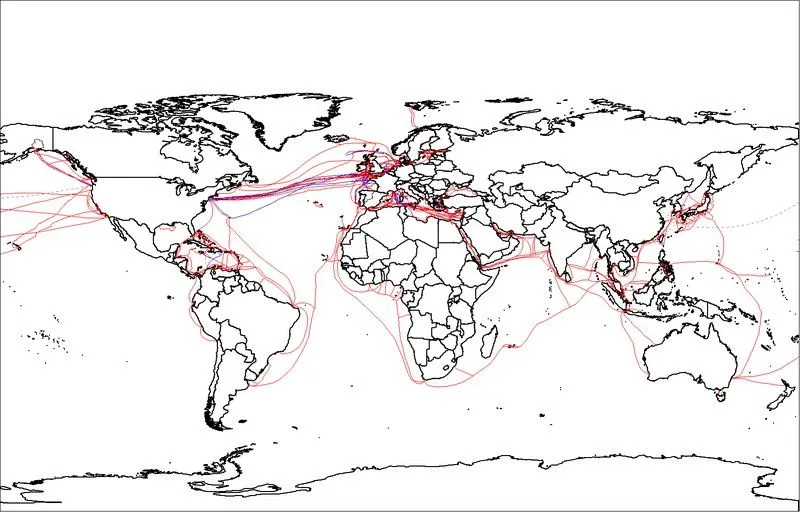
However, how does the packet move from country to country? Well, did you know that there is a massive network of wires connecting Internet hubs all over the world? These wires cross land, seas and even the expanse of entire oceans! All these wires are fiber optic cables, which carry data as pulses of light. The light doesn’t move at the full speed of light in a vacuum (the glass slows it to about two-thirds of that, roughly 200,000 km/s, or 124,000 mi/s), but that is still blisteringly fast. Yeah, they’re that quick.
The Reply
Once the server has received your request, it is ready to send the website, but the website may consist of text, images or videos that are too big to send as a single packet of data. Thus, the server breaks down the website into multiple packets of data and sends them along.

Now, these multiple packets make the same journey as the request did, but it’s not necessary that all the packets travel the same route. For attaining faster speeds and not getting stuck in traffic, each packet takes its own route. Suppose that we want to send a website from California to London. Some packets might take the direct California-New York-London route, while other packets might go from California to North Carolina to Montreal and then on to London. Other packets might go to Miami and then London. The point is that the packets choose routes such that they reach your device at roughly the same time (give or take a few microseconds).
Now that all the packets have reached your device, all that remains is the reconstruction of the website, which is done by a method called sequencing. When the server broke the website down to multiple packets, it gave a sequence number to every packet stored inside it. Now, your device uses the same sequence to recreate the website you want. And voilà! You have your website!
You clicked on the website you wanted to visit some 500 words ago! The process that goes on behind the scenes to access your website within those few seconds is simply staggering. Regardless of where you are in the world, an average Internet speed will load and deliver your website in a matter of seconds. Such is the marvel of modern science. Remember that somewhat remarkable journey next time you click on a website link!