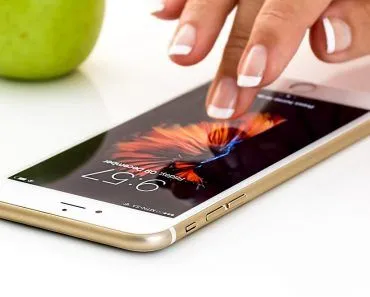
LCD screens ripple when you press them because pressing the screen physically disturbs the alignment of the liquid crystals inside the affected pixels. Each pixel relies on those crystals being twisted in a precise pattern to filter the right amount of red, green and blue light through; squash them and the polarisation gets scrambled, so you see rainbow-coloured ripples around the contact point until the crystals relax back into place. CRT and OLED screens have no liquid crystals and don’t show this effect.
To point out a location on a map or identify a person in a group photo to a friend, we invariably end up putting our fingers on the computer/laptop screen. While doing that, have you noticed that sometimes tiny ripples form around your fingers?
If your desktop/laptop screen shows those ‘ripples’ when you press a finger against it, it implies that you have an LCD screen. So-called ‘LED monitors’ are usually still LCDs underneath (with LED backlighting in place of an older fluorescent backlight), so they ripple too. CRT monitors have no liquid crystals at all, and modern OLED screens (common on flagship phones and high-end TVs) use self-emissive organic pixels rather than backlit liquid crystals, so neither one shows the ripple effect. However, before we get into this strange predilection of LCD screens, let’s have a quick look and do a quick background check on liquid crystals.
Liquid Crystals
The term ‘liquid crystals’ can be somewhat paradoxical; after all, how can something be solid and liquid at the same time? This thought pops up in our heads because we are so used to the idea of only three states of matter, namely solid, liquid and gas. However, that’s not so; in fact, there are not one or two, but many other states of matter. (For more information, check out How Many States of Matter Are There?). Liquid crystals are also a state of matter.
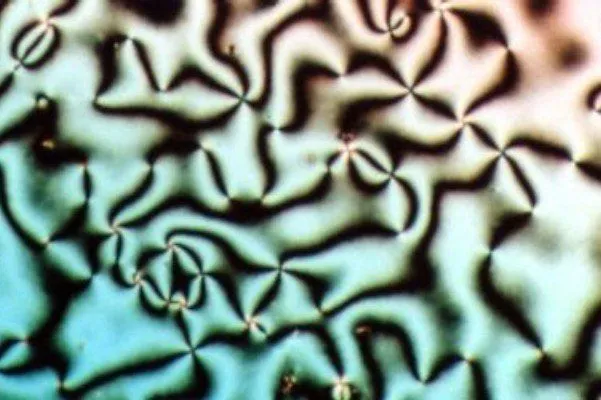
As their name suggests, they share their properties and characteristics with both solids and liquids. It is due to liquid crystals that televisions have transformed from being power-guzzling, beastly machines occupying one entire corner of a room to being light and portable enough to be hung on the wall, consuming only a fraction of what primitive televisions consumed to operate.
The characteristic of liquid crystals that makes them ideal to be used in display screens is that they align themselves when an external electric field is applied to them. To be more technically specific, these liquid crystals are sandwiched between two glass substrates that each carry a thin polarising filter (the polarisers, not the glass itself, are what filter the light). Light from a backlight (fluorescent in older monitors, LED in modern ones) falls on the first polariser and passes on to the liquid crystals.
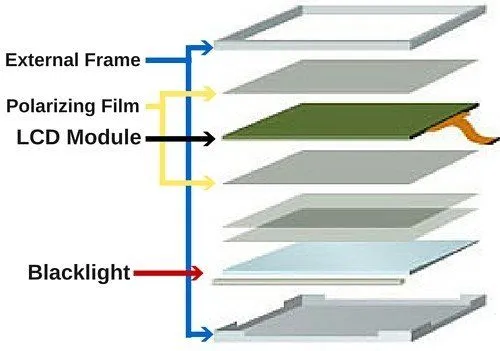
Now, these crystals align themselves in a way that allows varying levels of light to pass through and subsequently incident on the second piece of glass. The results of this process are the images that you see on the display screen. Note that liquid crystals don’t emit any light themselves; rather, they control whether light gets through them or not by aligning themselves in various patterns.
Pixels
A pixel (short for ‘picture element’) is the smallest point on an image. The higher the number of pixels, the more information is projected through them, meaning more sharpness and clarity of the image. Each LCD pixel consists of three sub-pixels: red, green and blue, one of each. Electric signals make the liquid crystals within each sub-pixel twist and align so they let the right amount of red, green or blue light through, mixing into the millions of colours you see on the screen.

Why Do LCD Screens Ripple?
Now that you know what liquid crystals are and how they align themselves to show different colors on a screen, let’s go back to the question posed in the title of this article. Under normal conditions, namely when your fingers are clicking away on the mouse rather than moving around on the screen, the alignment of liquid crystals is normal, and everything is alright.
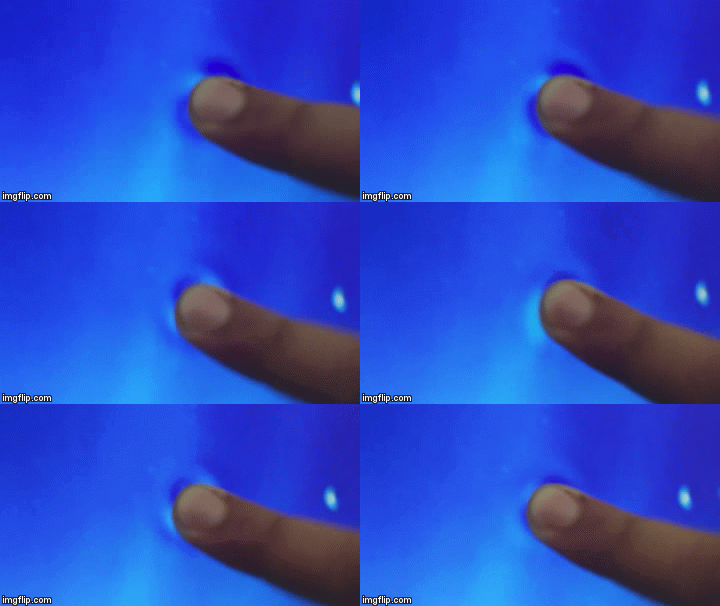
However, the moment you put your finger on the screen (to identify the person standing fourth from the top left corner in the class photo, to your friend), you essentially disturb the alignment of the liquid crystals in those pixels. As a result, you see rainbow-colored ripples forming around the point where your fingers touch the screen, as the misaligned liquid crystals cause cells in the pixels to get confused about what colors they are supposed to display. The good thing, though, is that they return to their normal state as soon as you remove your finger.
We know that there are much more sophisticated ways of pointing things out on a computer monitor (like using the pointer of the mouse); yet somehow we invariably tend to poke at the screen with our fingers instead. This isn’t particularly wise, especially if you do it for long periods of time or with extreme force, as you can do permanent damage to the image quality of your screen! So be careful, and keep your fingers where they belong!
What Is ‘Pooling Mura’, And Why Does The Ripple Trail Your Finger?

If you have ever pressed a finger to the screen and dragged it, you may have noticed something stranger than a tidy circular ripple: a pale smear that follows the finger and lingers for a moment after it has gone. Display engineers have a name for this. They call it pooling mura (mura is the Japanese word for unevenness or blotchiness that the display industry uses to describe patchy, non-uniform brightness).
The reason the smear trails behind your finger comes down to how thin and how precisely tuned the liquid crystal layer really is. In a typical twisted-nematic LCD, the crystals sit in a gap only about 5 to 10 micrometers wide, sandwiched between two glass plates that carry transparent indium tin oxide electrodes and a rubbed alignment layer that sets the resting twist. When you push and drag across the front glass, you momentarily change the alignment of the liquid crystal molecules at every point the pressure passes over. On a typical ‘normally white’ panel that shows up as a pale trailing smear, and as one display patent describing the effect puts it, the smear “disappears after a period of time because of returning alignment of the liquid crystal molecules.” In other words, the molecules need a few frames to settle back into their twisted resting pattern, which is exactly why the ripple seems to chase your fingertip and then fade rather than vanishing the instant you lift off.
So the everyday ‘ripple’ and the engineer’s ‘pooling mura’ are the same physics seen at two different scales: a tiny, self-healing dent in a layer of liquid crystal only a few millionths of a meter deep.
Can Poking Your LCD Screen Actually Damage It?

This is the question most people really want answered before they jab at a class photo: is that rainbow ripple a warning sign, or is it harmless? The honest answer is “usually harmless, occasionally not,” and the dividing line is whether you have pushed the panel past its ability to spring back.
A gentle press produces what materials people call reversible (elastic) deformation. You briefly squeeze the cell gap, the crystals lose their precise twist, the colors scramble, and the moment you let go the layer relaxes and the image is perfect again. No harm done. The rainbow effect itself does not damage anything; it is simply the screen telling you the crystals have been nudged out of alignment, and they realign the instant the pressure is released.
Trouble starts when the force is hard, sharp or prolonged. Press with a fingernail or a pen tip, or lean heavily on the same spot, and you can cross into permanent (plastic) deformation: the microscopic spacers that hold the two glass plates apart can stay compressed, leaving a localized dip where the crystals never realign properly. That shows up as a lasting bright or dark blotch, and in the worst case a sub-pixel driver is damaged and you are left with a genuine dead pixel that no amount of waiting will fix. This is also why liquid spills matter: the liquid does not realign anything by itself, but the pressure of wiping a wet screen, or a piece of grit trapped under your fingertip, adds exactly the kind of abrasive, concentrated load that turns a harmless ripple into a permanent mark. The same caution applies when a screen protector is squeegeed on with a hard tool.
The practical rule, then, is the one your screen has been hinting at all along: a light, brief touch is fine, but treat the panel as the few-micrometer-thin layer of liquid it really is, and point with the mouse whenever you can.
References (click to expand)
- Liquid crystal - Wikipedia. Wikipedia
- How do LCDs (liquid crystal displays) work?. explainthatstuff.com
- DA Katz. Investigation of a Liquid Crystal Watch - chymist.com. chymist.com
- Why do liquid crystal displays (LCDs) visually distort under .... Stack Exchange
- Method for mitigating pooling mura on liquid crystal display apparatus. US Patent 8,581,878 B2. Google Patents
- Twisted-nematic cell. Encyclopaedia Britannica
- Liquid Crystal Displays. MIT Media Lab