Table of Contents (click to expand)
A touch screen detects a finger or stylus and turns it into input. The five main types (resistive, surface capacitive, projected capacitive, infrared, and surface acoustic wave) each sense touch differently: by pressure, by a change in an electric field, by breaking a grid of light beams, or by absorbing ultrasonic waves on the glass.
Touch screens are so standard these days that we can hardly remember the magic and awe they brought when they entered the world stage. Even today’s toddlers handle touch screen devices with ease when they want to play their favorite video game or watch their cartoons on YouTube. Although they are everywhere these days, how do these touch screens work? Is there only one type? Let’s take a closer look at the first kind of touch screen ever introduced.
Resistive Touchscreens
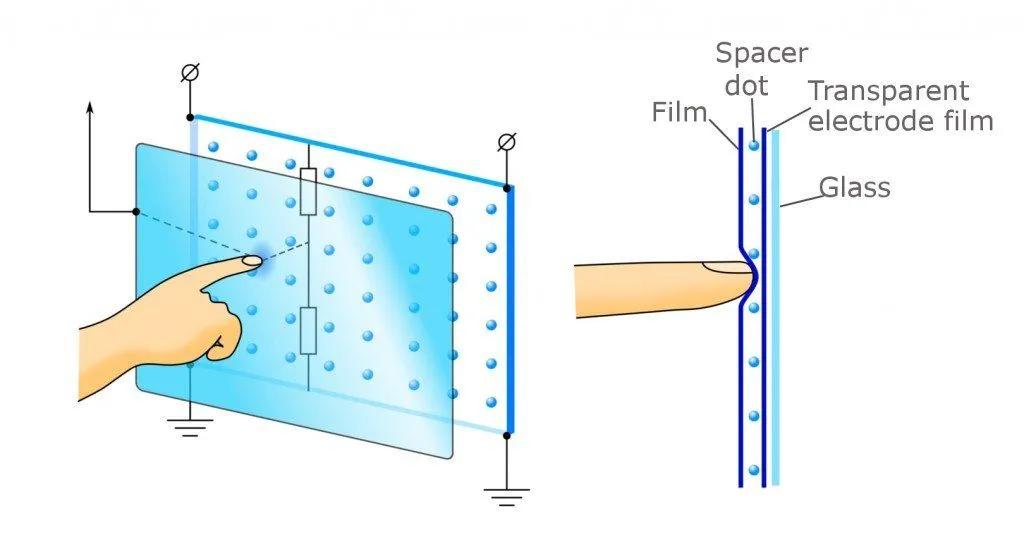
These are the most basic and familiar types of touchscreens out there. Resistive touchscreens are common in ATMs, point-of-sale terminals, and supermarket self-checkout kiosks. The screen itself is a sandwich: a flexible plastic top film and a rigid substrate (usually glass) sit a hair’s-breadth apart, separated by microscopic insulating spacer dots, and each layer is coated with a transparent conductive film of indium tin oxide (ITO). A small voltage is applied across one layer, creating a uniform voltage gradient from edge to edge. When you press the top film hard enough that it dips down and touches the bottom layer, a controller reads the voltage at the contact point and converts it into precise X and Y coordinates.
A resistive touchscreen only responds to pressure and doesn’t care what’s doing the pressing: a fingertip, a gloved hand, a stylus, or even a pencil eraser all work. Most resistive panels only register a single touch point and don’t handle pinch-to-zoom or other multi-touch gestures, which is one big reason they fell out of favor for smartphones. The flexible plastic top film also scatters more light than a hard glass cover, so the image looks a touch hazier than on a capacitive screen.
Capacitive Touchscreens
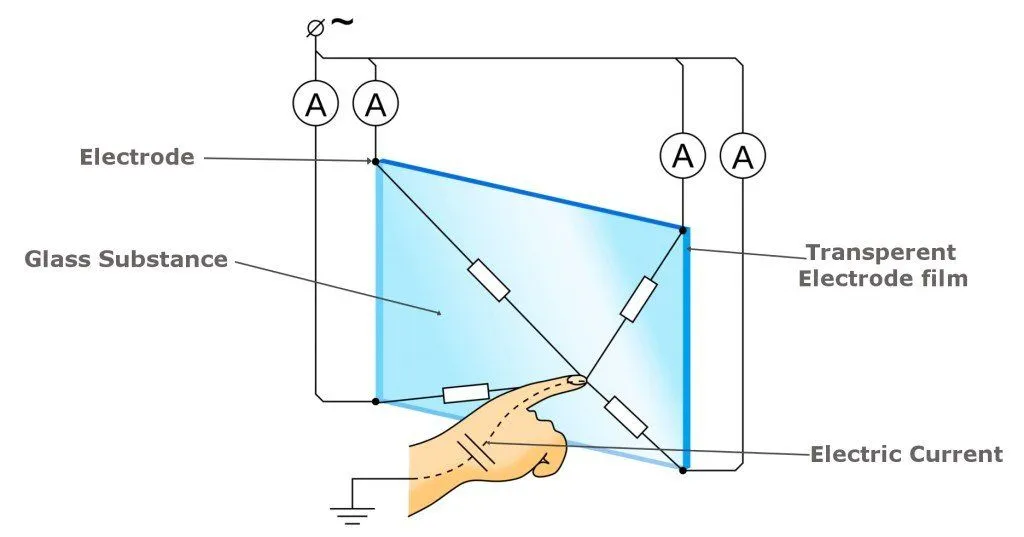
Surface capacitive touchscreens, the simpler of the two capacitive variants, use a single transparent conductive coating (typically indium tin oxide) applied to a glass panel and sealed under a thin protective layer. A small voltage is applied at each of the four corners, creating a uniform electrostatic field across the surface. When a finger touches the screen, a tiny amount of charge drains away through the body, and the controller measures the resulting drop at each corner to triangulate the touch point. Because the system relies on the conductivity of the human body, it ignores most ordinary gloves and non-conductive styluses, and only responds to a bare fingertip or a conductive stylus.
Capacitive screens are clearer than resistive ones because the cover is rigid glass rather than flexible plastic, and the durable glass surface shrugs off everyday contaminants like dust, grease, and splashes of water. The downside is that they can be thrown off by electromagnetic and radio-frequency interference, and they don’t register touches through gloves or fingernails.
Projected Capacitive Touchscreen
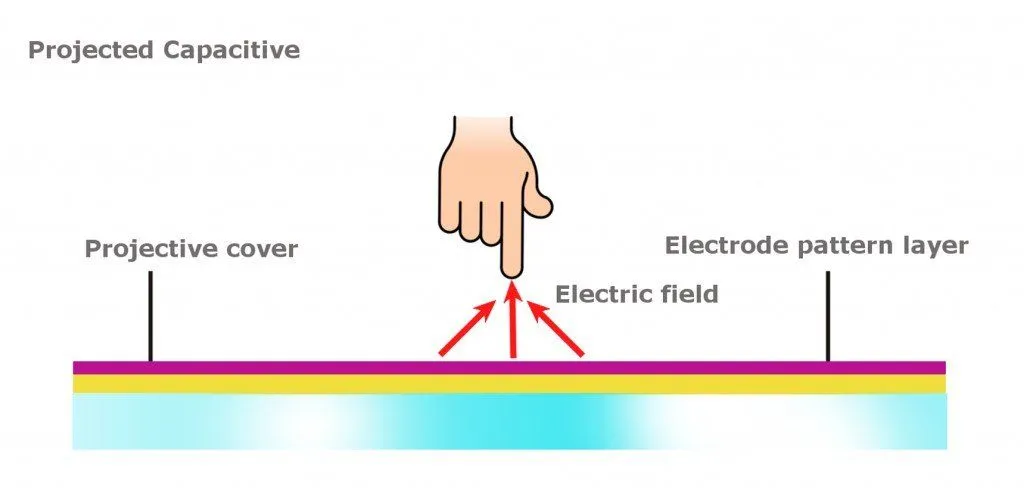
Projected capacitive (PCAP) is the technology behind almost every modern smartphone, tablet, and laptop touchpad. Instead of a single coating, it uses two layers of transparent indium tin oxide etched into a fine grid of rows and columns, separated by a thin insulator. At every intersection where a row crosses a column, the two electrodes form a tiny capacitor, and a controller chip continuously measures the capacitance at each one. A finger near the surface disturbs the local electrostatic field and changes the capacitance at the nearest intersections, which lets the controller pinpoint not just one touch but ten or more simultaneous touches, the basis of pinch-to-zoom, two-finger scrolling, and on-screen keyboards. Standard PCAP screens still need a bare finger or a conductive stylus, but with the sensitivity turned up (a so-called “glove mode”) they can detect a thin glove too, which is why industrial and outdoor variants increasingly support gloved use.
Infrared Touchscreens
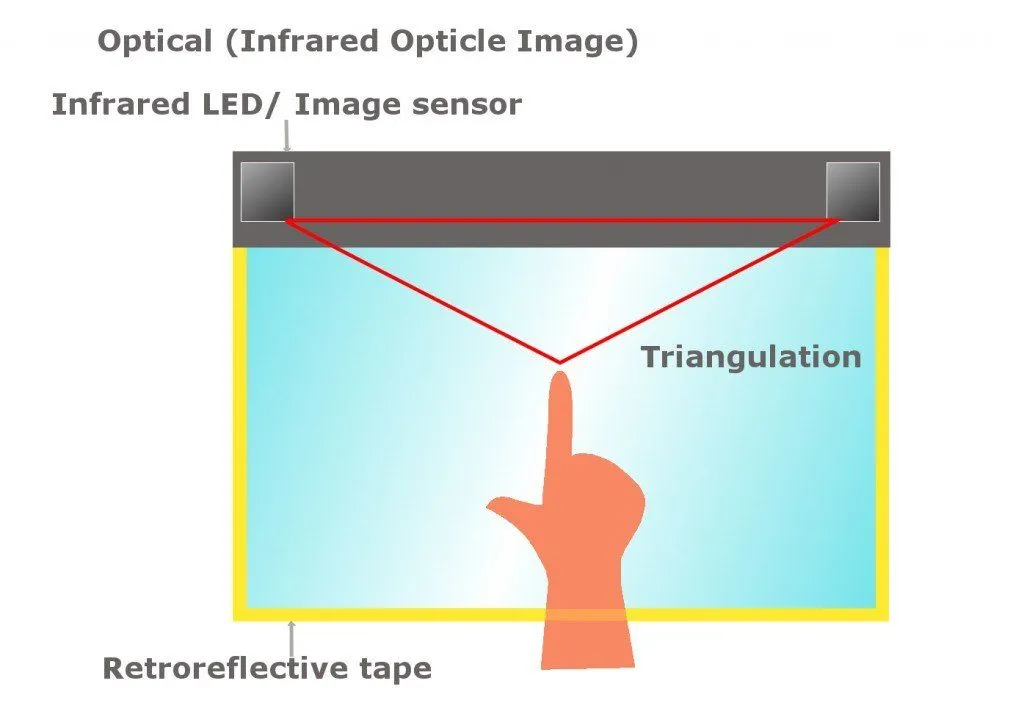
Unlike other technologies, infrared touchscreens do not overlay the screen with an extra layer. These types of touchscreens are based on light beam interruption technology. An infrared touchscreen uses infrared emitters and receivers to create an invisible grid of infrared light beams across the screen. Not having an extra film or layer means the best possible image quality and clarity. A sensor detects a person’s touch when an object interrupts the light beams. This enables multi-touch and also does not require the user to apply pressure to register a touch. Even if the screen is scratched, it works completely fine, and other objects aside from one’s fingers can be used to work with this touchscreen. The disadvantage to this technology is that sunlight can sometimes affect its functionality.
Surface Acoustic Wave (SAW) Touchscreen
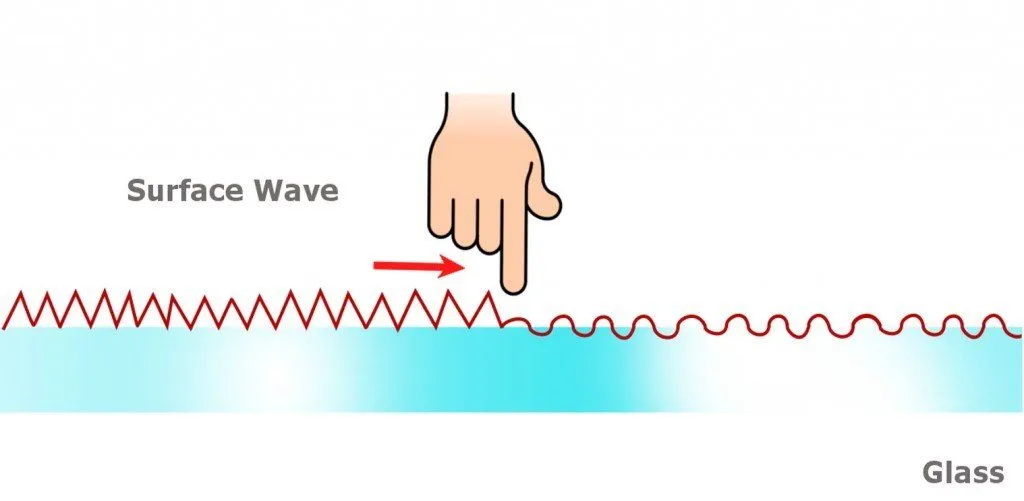
A Surface Acoustic Wave (SAW) touchscreen uses a different trick entirely. Piezoelectric transducers mounted along the edges of a glass panel send out bursts of high-frequency ultrasonic waves that travel across the surface, bounce off reflector ridges along the panel’s perimeter, and arrive at receivers on the opposite edges. When you touch the glass, your finger absorbs a portion of the wave at that exact spot, and the controller works out the touch point by noting which wave arrived weakened and when. SAW screens have excellent optical clarity because nothing is laminated to the glass, and they last a long time because there is no film to wear out. The catch is that they only register touches from soft, sound-absorbing objects: a finger, a gloved hand, or a rubber-tipped stylus will work, but a fingernail, the tip of a hard pen, or the edge of a credit card will not. Water droplets, dust, or grease on the surface can also block the waves and create dead spots until the screen is wiped clean.
References (click to expand)
- What is a capacitive touchscreen and how does it work? TechTarget.
- Touchscreen. Wikipedia.
- Resistive touchscreen. Wikipedia.
- What’s the Difference Between Resistive and Capacitive Touchscreens? Electronic Design.
- Touchscreen: An Engineered Harmony between Humans and Machines. Illumin, USC Viterbi School of Engineering.